


The immediate appeal of the dashboard is in its flexibility and the speed with
which interfaces to KTL-based instruments can be generated. The interface shown
in Figure 2 was created just as a demo, to exercise and debug the first release
of ``Dashboard"; it took about 4 hours to create the toplevel screen, and about
another 3 hours to create four subdashboards (which pop up on double-clicks from
the main board).
The dashboard is also (usually) ``live" during design and prototyping; there is
no compile/link/test cycle. As soon as the keyword information is absorbed and
a widget is created, that widget is ``real", watching a real keyword value in
a running KTL system (unless the designer is running in fake mode).
If the engineers change their minds about hardware/software design
or function, those changes are first reflected in the keyword database.
The application then effectively retools itself to match these design changes,
always provided that the keyword database is properly maintained.
Since the keyword
database is the foundation of a number of applications, not just one,
the likelihood of its proper maintenance (and of someone's noticing any
errors or inconsistencies) increases with the number of applications that depend
on it. Also, the availability of interactive X11 forms
(Figure 6) and other GUI and
command-line tools for editing database information makes it relatively easy
for developers to keep the central knowledge base current and accurate (as
opposed to the manual editing of many distinct copies of the same information
in the form of code, config files, man pages, typeset documents, etc.)
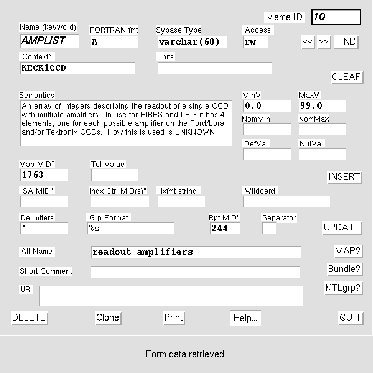
Figure 6: Typical GUI form used to edit keyword data
The dashboard is a single application, with one maintenance
cycle and one investment
in development, which can be used to provide engineering/diagnostic interfaces,
deployed user interfaces, prototype UI designs, etc., for any
number of instruments
sharing the KTL control protocol. In the past, we developed
individual interfaces
per instrument per application, and these interfaces were burdensome to improve
or repair; as a result, user complaints and feature requests
were seldom resolved.
The ``softness" of the dashboard means that the advanced user can tweak its
appearance to suit his/her own tastes, or design entirely original personal
dashboards for specific purposes; the deployment mode means that it can
be given to naive end users as a ``canned" UI. The designer who must
support a deployed
version can easily and quickly implement most user requests, without tedious
recoding and recompilation, by replacing a single platform-independent
layout file.
Being based entirely on publicly-available code, the dashboard is free and
portable. It runs as well on our Linux laptop, or my Linux home computer, as
it does on Dec Alpha or Sun Sparc platforms.