


The ``Dashboard" application is a fairly slender body of code relying heavily on a large infrastructure (FIGURE 1).
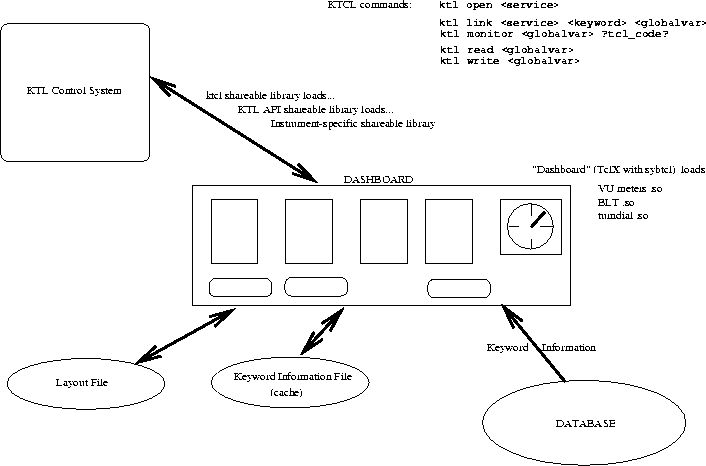
Figure 1: Dashboard Function Diagram
It requires a set of Tcl extensions
as well as KTL shareable object libraries, and access to the keyword database.
Mr. William Lupton of CARA wrote the ``ktcl" extension [KSD98]
which adds the KTL API to Tcl.
Through this API the application can open a KTL ``service", register interest
in automatic broadcast updates of KTL keywords, and read/write individual keyword
values. ``Dashboard" also relies on TclX [TclX], and can use the VU widgets
[VUW], the BLT plot widget [BLT], and the LLNL TurnDial widget [TurnDial].
It is fairly trivial to add new ``meter" types to the dashboard. We used the
Sybtcl [SybTcl] extension for access to the keyword database.
The application reads from the database (or from an ASCII save file of
information originally read from the database) the complete descriptions of
a set of keywords corresponding to a KTL ``service", i.e. the keywords relevant
to a particular instrument or subsystem. It creates a canvas on which the user/designer
can deploy ``meters" and ``graphics". Meters are associated directly with
keywords, and display the keyword values. Some meters can also be used
to set keyword values. Graphics can decorate and annotate the dashboard, and
change their state to flag various conditions (more on this later).
How is this done? The KTL API extension implements a ktl link command which
associates any given keyword with a global Tcl variable; the global variable
can then be used as the argument to a ktl read or ktl monitor
command. If the keyword is being monitored, the KTL control system sends out broadcast
messages on each value change, to all processes which have registered an
interest in that keyword. The ktcl extension responds to these broadcasts by
automatically updating the global variable with the new value (and optionally,
by executing a user-defined Tcl code section). The application can explicitly
read the value at any time; however, network traffic is reduced by permitting
the KTL control system to broadcast values only when they change.
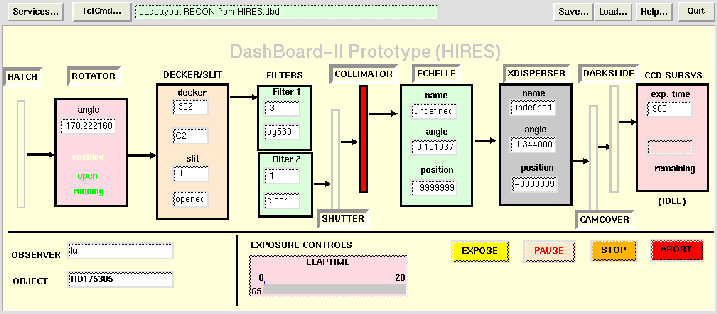
Figure 2: Prototype dashboard for HIRES instrument
A detailed description of how KTL and the telescope/dome/instrument
control mechanism really work is beyond the scope of this
present paper. However, for those who are interested in realtime control
systems, the Keck Software Documents previously cited plus a Lick Observatory
Technical Report [Music] should provide an overview of
the infrastructure of which ``Dashboard" is the topmost layer.
When the dashboard user creates (e.g.) a ``TextBox" meter using the
Tk entry widget, the application simply uses the global variable
created by ktl link as the textvariable for the entry widget, and the
display is automatically updated on each KTL broadcast. For widgets which
do not have the ``associated textvariable" feature, the optional Tcl callback
code is used to execute an update procedure for that meter type. In
addition to the global variable created by ktl link, the application
maintains for each keyword a ``desired value" variable, which the user
can adjust; a Commit operation is supported in which the user's ``desired
values" are written back to the KTL system.
In detail, the application maintains for each keyword a list of Tcl commands to
be executed each time that keyword changes. The callback code uses the keyword
name as an index into an array of these lists of commands, retrieves
the list, then evaluates
each command. Thus any number of meters dependent on one keyword can be
be updated when that keyword value changes; each command is eval'd, so any
number of meters dependent on one keyword value are all updated by the one
procedure call. (In the first draft of the code, I used the Tcl trace
mechanism; but using the callback code option of the ktl monitor
command reduced the lines of code slightly and looked cleaner.)